Supabase to AWS RDS Migration
Migrated a 20GB production PostgreSQL database from Supabase to AWS RDS with near-zero downtime — no maintenance window, no data loss, PostGIS geometry fully preserved. The core challenge was making AWS DMS work entirely within Supabase's permission model, without superuser access, under continuous live replication. Cutover was a single connection string change, approved only after three independent data integrity checks passed.
Role: DevOps Engineer
Stack: AWS DMS · AWS RDS (PostgreSQL) · Supabase (PostgreSQL) · Terraform · EC2 Bastion · Secrets Manager
What Was Delivered
Migrated a 20GB production PostgreSQL database from Supabase to AWS RDS with near-zero downtime — no maintenance window, no data loss, PostGIS geometry fully preserved. The migration ran entirely within Supabase's permission model without superuser access, and was validated across three independent integrity checks before cutover was approved. Cutover itself was a single connection string change.
The Challenge
The product had outgrown Supabase's managed offering. The team needed custom PostgreSQL extensions, lower-latency connections from their AWS application tier, and the ability to tune the database directly — none of which were possible without migrating to a self-managed RDS instance inside their own VPC.
The hard constraint was the live production system. A conventional dump-and-restore meant hours of downtime for a database that couldn't afford it. The database also contained PostGIS geometry columns, large object data, and a schema rename requirement — one schema needed to land under a different name on the target, since the application was being refactored in parallel. All of this had to be handled correctly under continuous live replication.
The DMS Configuration
This is where the real work was.
AWS DMS defaults to the pglogical plugin for PostgreSQL logical replication, which requires superuser privileges on the source to install an extension and attach DDL event triggers. Supabase doesn't grant superuser. The first DMS task run failed within seconds — DMS tried to create its audit infrastructure, hit a permission error, and aborted.
Three configuration decisions resolved this:
1. Disable DDL capture. Set CaptureDdls=false in the task settings. The schema is already defined on the target — replicating DDL events isn't needed for a one-time migration.
2. Switch to pgoutput. This is PostgreSQL's built-in logical replication protocol, available without any external extension. It requires a publication and a dedicated replication user — both creatable without superuser:
CREATE PUBLICATION migration_pub FOR ALL TABLES;
CREATE ROLE replication_user WITH REPLICATION LOGIN PASSWORD '...';
GRANT SELECT ON ALL TABLES IN SCHEMA public TO replication_user;
The replication slot is also pre-created before the DMS task starts, so DMS attaches to an existing slot rather than trying to create one using the unavailable plugin.
3. Keep the slot alive. After full load completes, DMS has an option to stop the task automatically. If it stops, the replication slot on the source becomes invalid — Supabase drops any slot with no active consumer. The task setting "Do not stop after full load" keeps DMS running and transitions it directly from bulk load into CDC mode, maintaining the live sync.
Infrastructure
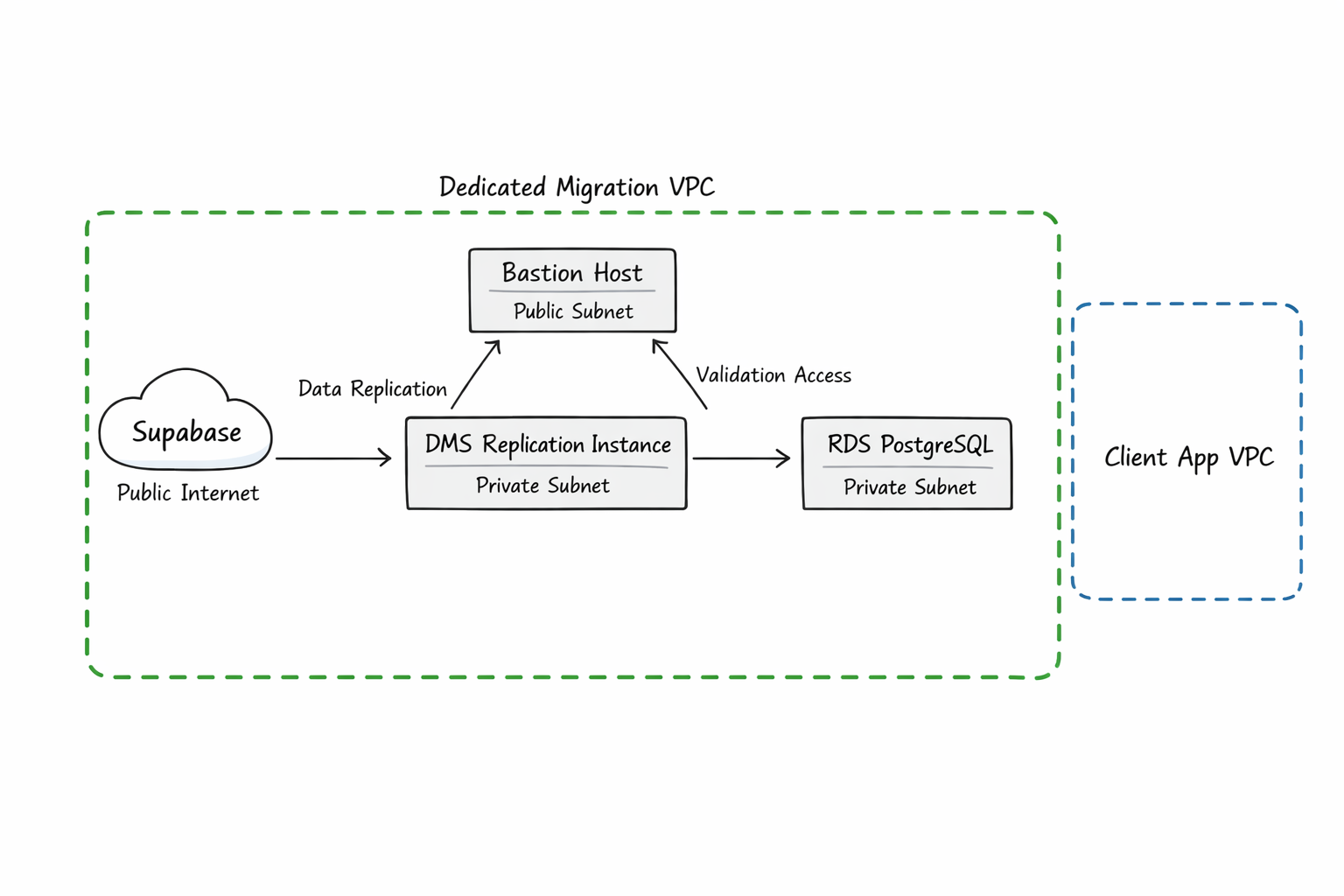
All migration infrastructure was provisioned via a single Terraform configuration — auditable, version-controlled, and torn down cleanly after cutover.
A dedicated VPC isolated migration traffic from the application environment, with DMS and RDS in private subnets and a bastion host for validation queries. The bastion's user_data installs all required PostgreSQL extensions and creates the renamed target schema on first boot — if the instance is ever replaced, it self-heals without manual steps.
The DMS replication instance was deliberately over-provisioned after an early attempt on a smaller instance class failed mid-replication from memory pressure. The larger instance handles buffering large transactions without stalling CDC. Storage was provisioned as io2 Provisioned IOPS to avoid throttling under sustained replication write load.
DMS endpoint credentials are stored in Secrets Manager and referenced by ARN — never written to any file, never committed to version control.
Schema Transformation and LOB Handling
One schema was renamed between source and target using a DMS table mapping transformation rule that rewrites the schema identifier during replication. The bastion creates the target schema at launch, so DMS can begin writing immediately without a schema-not-found error.
Several tables include PostGIS geometry columns, which DMS treats as large objects. These were being silently truncated on the initial run. Raising the LOB size limit in the task settings resolved this — subsequent integrity checks confirmed that row fingerprints matched for all affected tables.
Data Integrity Validation
Cutover is only safe when the data can be proven identical. Three validation layers were run before anyone approved the switch:
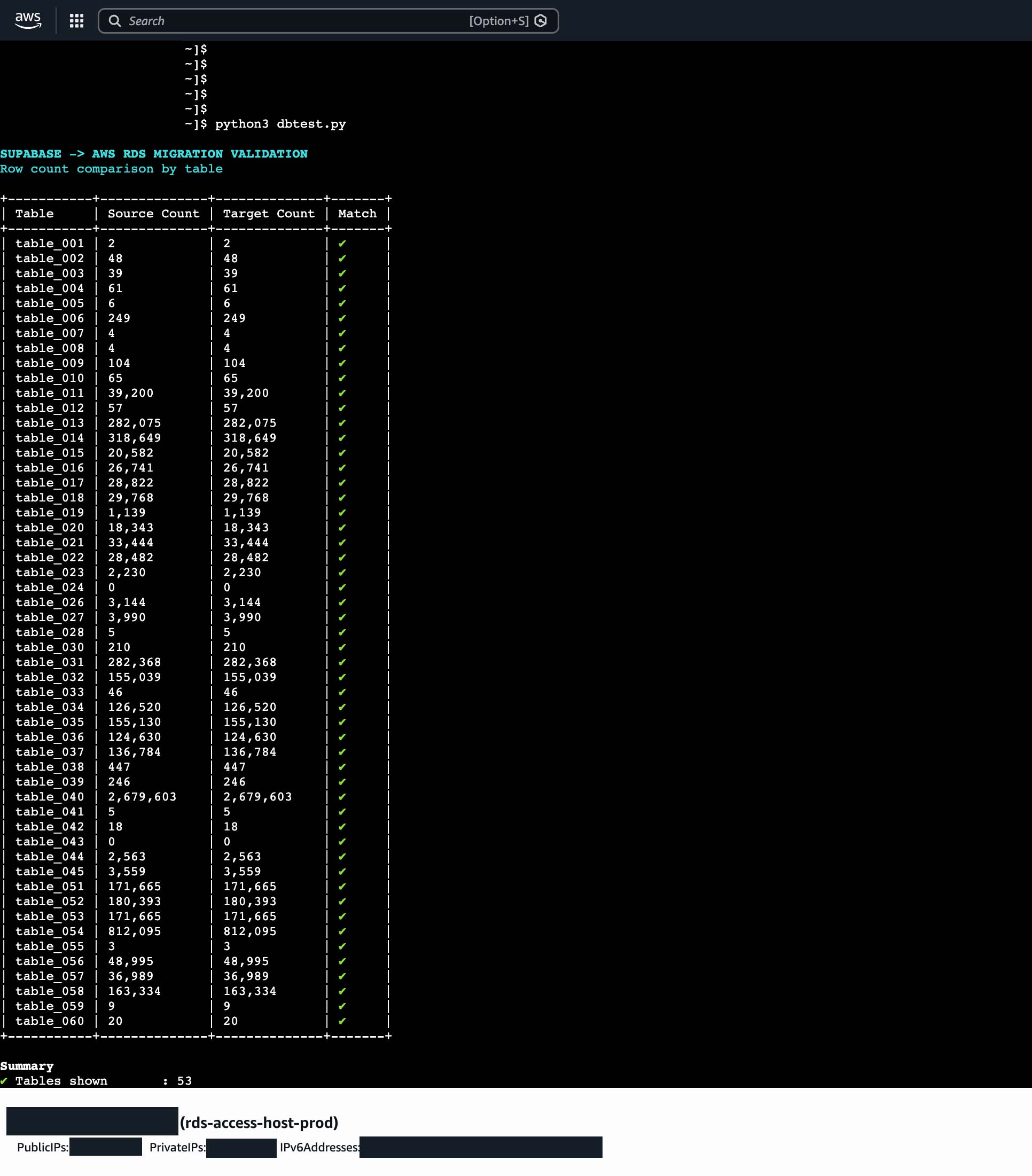
Row counts — a script compares counts per table across source and target. Run once after full load completes and again after several hours of CDC, to confirm ongoing changes are landing correctly.
Schema diffs — column names, types, and nullability are compared for every table. This catches anything DMS silently skipped or mis-typed during the bulk load phase.
Row fingerprinting — for critical tables, an MD5 hash is computed over all rows ordered by primary key on both sides. This is the highest-confidence check: it catches data corruption, row reordering, and truncation that row counts alone would miss.
All three passed before cutover.
Results
- Near-zero downtime. CDC kept the target in sync throughout validation. Cutover was a connection string change, not a maintenance window.
- Full data integrity verified across row counts, schema diffs, and row-level fingerprints.
- PostGIS geometry preserved. LOB limit tuning ensured no silent truncation of spatial data.
- No superuser required on Supabase. The
pgoutputapproach works entirely within the platform's permission model.
- Infrastructure codified and disposable. The full migration stack was provisioned by Terraform and cleanly destroyed after cutover.
Related reading: Why pgoutput beats pglogical for Supabase migrations · DMS Replication Slots: What Nobody Tells You